 Soniya
Introducing OneTap: Multi-Channel Live Chat Widget by ChatMaxima
Soniya released this on Sep 22, 2025
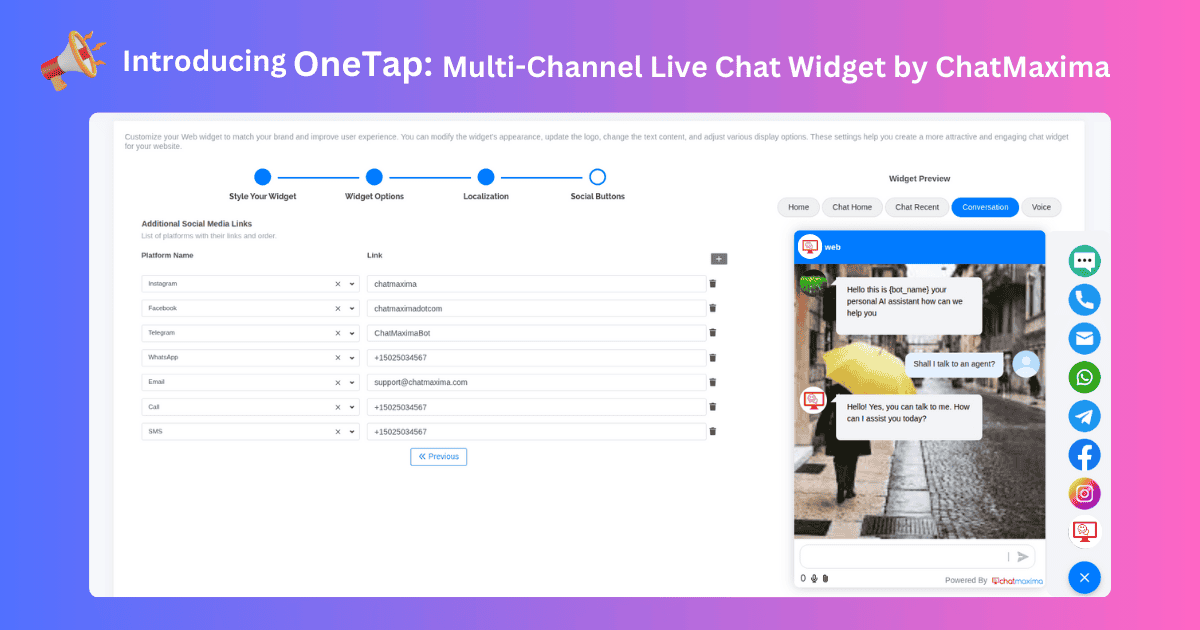
We’re excited to introduce OneTap, a powerful enhancement to the Live Chat widget that lets you add multiple social and communication shortcuts for your visitors.
What’s New
-
Multi-Channel Buttons: Add quick links to Facebook Messenger, WhatsApp, Instagram, Telegram, SMS, and Phone.
-
Expandable Widget Panel: When users click the live chat icon, a sleek panel displays all your social options in one place.
-
Customizable Handles: Enter your own social media IDs, WhatsApp number, Telegram bot, email, and phone number.
How to Enable
-
Log in to the ChatMaxima Dashboard.
-
Navigate to Quick Access → Channels → Web Chat.
-
Click Actions → Edit Widget Settings.
-
Add your social media handles, WhatsApp number, Telegram bot, email, or phone number.
-
Click Submit to generate the revised widget code.
-
Paste the code into your website’s footer block.
With OneTap, your Live Chat widget becomes a full communication hub, giving visitors instant access to the channels they prefer.

.png)
_2.png)