Changelog

Releases

Stay up to date with new features, improvements, and bug fixes shipped to ChatMaxima Changelog.

44 releases
Jul 29, 2026
Channels
ChatMaxima Support ChatMaxima Support

WhatsApp templates now support named variables

WhatsApp templates now accept named placeholders like {{order_id}} alongside the numbered {{1}} style, so a template reads like the data it carries.

🏷️ Named variables end to end

Meta supports named parameters on message templates, and ChatMaxima now speaks both formats everywhere a template is used.

  • Template editor with a new Add Variable menu for inserting numbered or named placeholders at the cursor
  • Broadcasts that map your contact fields onto named parameters
  • Bot flows that fill named parameters from flow variables
  • API and MCP sends that accept the same named keys

Named variables make a template far easier to read and to hand over. {{order_id}} tells you what belongs there; {{3}} does not.

How to use it

  1. Open Campaigns and create or edit a WhatsApp template.
  2. Click Add Variable and choose the named format.
  3. Give the variable a name that matches your data, for example order_id.
  4. Submit the template to Meta for approval as usual.

Existing templates using numbered variables keep working exactly as before.
Oct 11, 2025
Chatbots
ChatMaxima Support ChatMaxima Support

ChatMaxima Product Updates - 11 October 2025

ChatMaxima Product Updates - 11 October 2025

We're excited to share the latest improvements to ChatMaxima! Our team has been working hard to enhance your experience with better knowledge management, improved training visibility, and powerful new features.

🎯 Knowledge Source Management Enhancements

Storage Size Tracking

You can now see exactly how much storage each knowledge source uses! We've added:

  • Storage size badges on the Knowledge Source management page
  • Document count displayed alongside storage information
  • Real-time calculation for newly trained content
  • Individual document sizes visible when viewing training content

This helps you better understand and manage your AI knowledge base storage.

Improved Document Training Visibility

We've completely redesigned how you view and manage your trained content: 

Metadata Display: Each content chunk now shows:

  • Chunk index number for easy reference
  • Meta title and description (for web pages)
  • Source document name
  • Unique vector ID
  • Character count

Smart Pagination: Navigate through your training content with ease:

  • Page numbers instead of just "Next/Previous" buttons
  • Jump directly to any page
  • See total page count and chunk count
  • Always starts from the beginning when viewing a document

Better Organization: All chunks are now displayed in sequential order based on their position in the original document, making it easier to review and verify your training data.

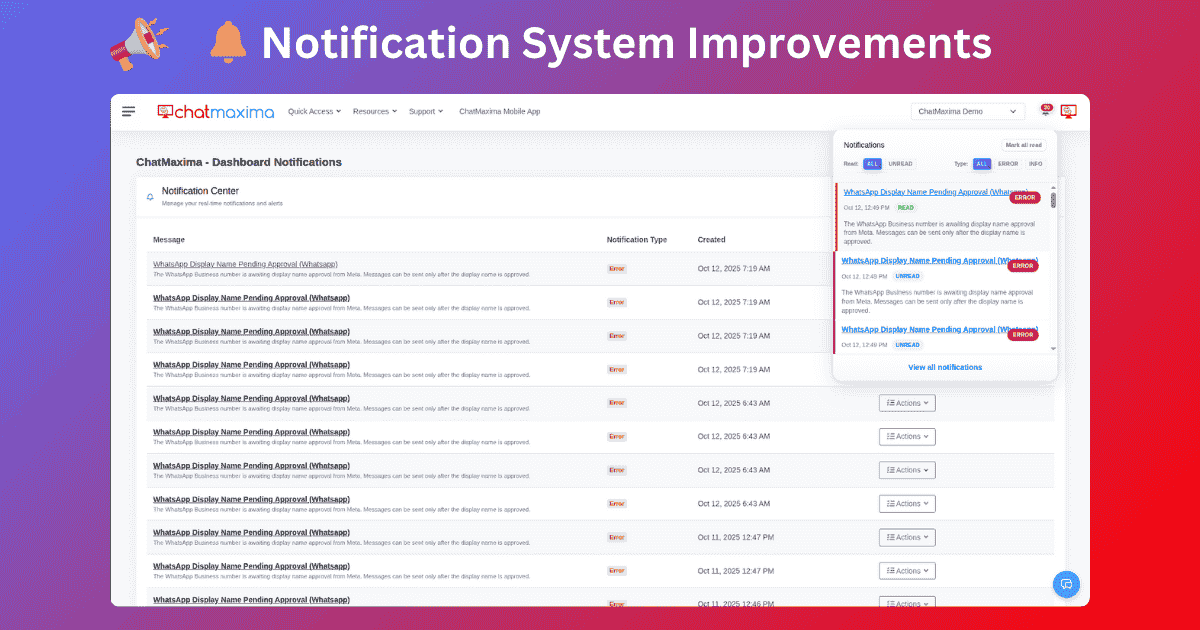
🔔 Notification System Improvements

Cleaner Error Notifications

We've fixed issues where error notifications contained HTML code or formatting issues. Now all notifications display clean, readable text that's easy to understand.

Console Cleanup

Removed unnecessary debugging messages from the browser console for a cleaner, more professional experience.

📊 MaxReplay Session Analytics (Private Beta)

Live Session Monitoring

Track visitor activity in real-time with our enhanced MaxReplay features:

  • Live watch functionality to see sessions as they happen
  • Real-time event streaming for immediate insights
  • Session duration tracking with time elapsed for each page visit
  • Improved playback controls for reviewing recorded sessions

Better Navigation

  • Fixed URL handling throughout MaxReplay interface
  • Improved back button functionality
  • Streamlined session viewing experience

🔧 Technical Improvements

Behind the scenes, we've made several improvements to ensure better performance:

  • Optimized content checking - Faster validation of trained documents
  • Batch processing - More efficient handling of multiple documents
  • Better error tracking - Comprehensive logging for troubleshooting
  • Document status management - Clearer indication of training progress

🐛 Bug Fixes

  • Fixed notification display issues in the bell icon
  • Resolved pagination starting position problems
  • Corrected storage size calculations for existing documents
  • Fixed session playback initialization errors
  • Improved error message formatting

What's Next?

We're continuously working to improve ChatMaxima based on your feedback. Stay tuned for more exciting features and enhancements! 

Questions or feedback? Reach out to our support team - we'd love to hear from you!

Sep 22, 2025
Channels
Soniya Soniya

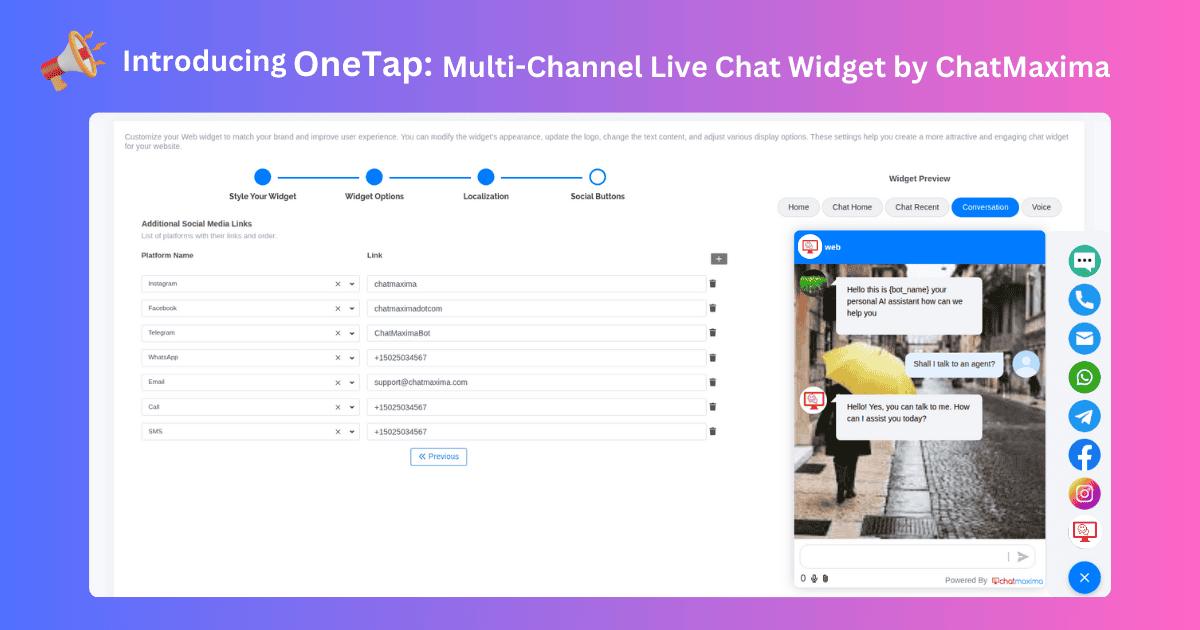
Introducing OneTap: Multi-Channel Live Chat Widget by ChatMaxima

Introducing OneTap: Multi-Channel Live Chat Widget by ChatMaxima

We’re excited to introduce OneTap, a powerful enhancement to the Live Chat widget that lets you add multiple social and communication shortcuts for your visitors.

What’s New

  • Multi-Channel Buttons: Add quick links to Facebook Messenger, WhatsApp, Instagram, Telegram, SMS, and Phone.

  • Expandable Widget Panel: When users click the live chat icon, a sleek panel displays all your social options in one place.

  • Customizable Handles: Enter your own social media IDs, WhatsApp number, Telegram bot, email, and phone number.

How to Enable

  • Log in to the ChatMaxima Dashboard.

  • Navigate to Quick Access → Channels → Web Chat.

  • Click Actions → Edit Widget Settings.

  • Add your social media handles, WhatsApp number, Telegram bot, email, or phone number.

  • Click Submit to generate the revised widget code.

  • Paste the code into your website’s footer block.

With OneTap, your Live Chat widget becomes a full communication hub, giving visitors instant access to the channels they prefer.

Aug 12, 2025
ChatMaxima Studio
ChatMaxima Support ChatMaxima Support

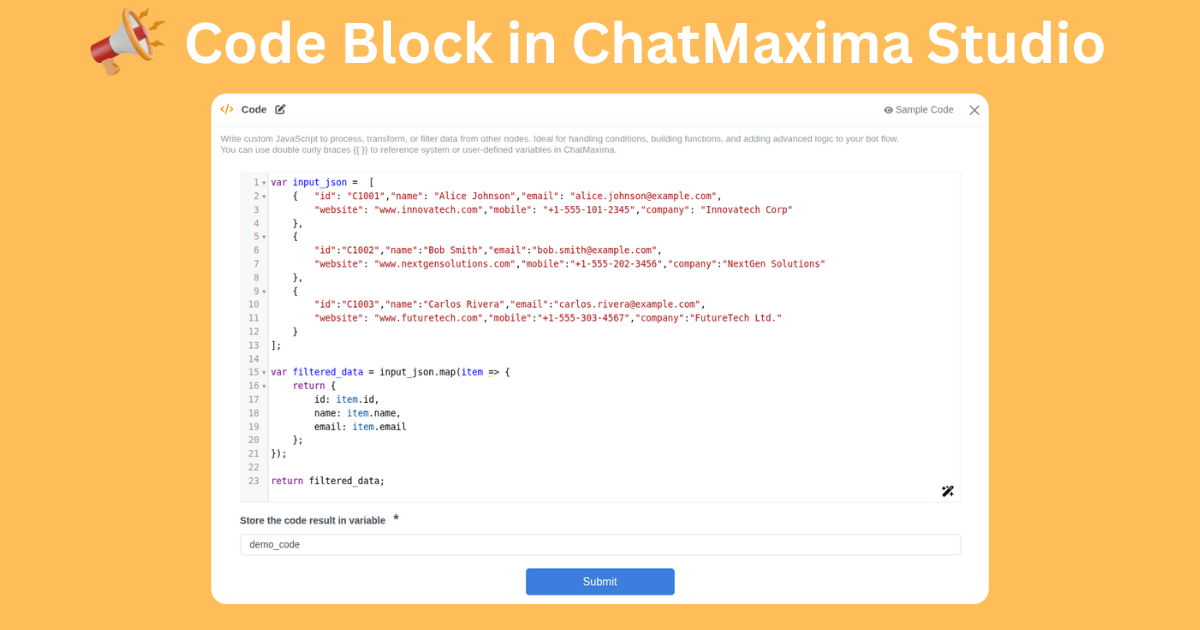
Code Block in ChatMaxima Studio 🧩

Code Block in ChatMaxima Studio 🧩

You can now add JavaScript Code Blocks directly into your workflow!

What It Does:

The Code Block lets you write custom JavaScript to manipulate data, perform conditional logic, or handle complex operations—right inside your bot flow.

Use Cases:

  • Transform incoming data before passing it to the next node

  • Add conditional checks to control flow logic

  • Merge or split fields dynamically

  • Call external APIs (coming soon)

Where to Find It:

Inside ChatMaxima Studio, drag and drop the Code Block into your workflow just like any other node.

Why It Matters:

⚡ Adds power and flexibility to your automation
🧠 Gives developers full control over logic
🔧 Perfect for advanced use cases

Start building smarter, more dynamic flows with Code Blocks today!

Aug 12, 2025
Channels Web Widget
ChatMaxima Support ChatMaxima Support

Pre-Chat Form for Web Widget

Pre-Chat Form for Web Widget

Now you can collect important visitor details before a conversation starts.

How to Enable:

  1. Go to Quick Access → Channels → Web

  2. Click Actions → Widget Settings for your web account

  3. Under Widget Options, toggle "Enable Pre-Chat Form" and click Submit

Customize Your Form:

You can add up to 5 fields, choosing:

  • Field Name

  • Field Type (Text, Email, Number, Textarea)

  • Required (Yes or No)

What Visitors Will See:

Once enabled, visitors will see a “Chat with Us” form with fields like:

  • Name

  • Email

  • Phone Number (optional)

The information is stored for the session—no need for re-entry during the chat.

Why Use It?

✔️ Personalize conversations
✔️ Collect leads up front
✔️ Route chats smarter

Try it out and streamline your support flow!