Changelog

Releases

Stay up to date with new features, improvements, and bug fixes shipped to ChatMaxima Changelog.

31 releases
Jul 15, 2025
ChatMaxima Studio
Soniya Soniya

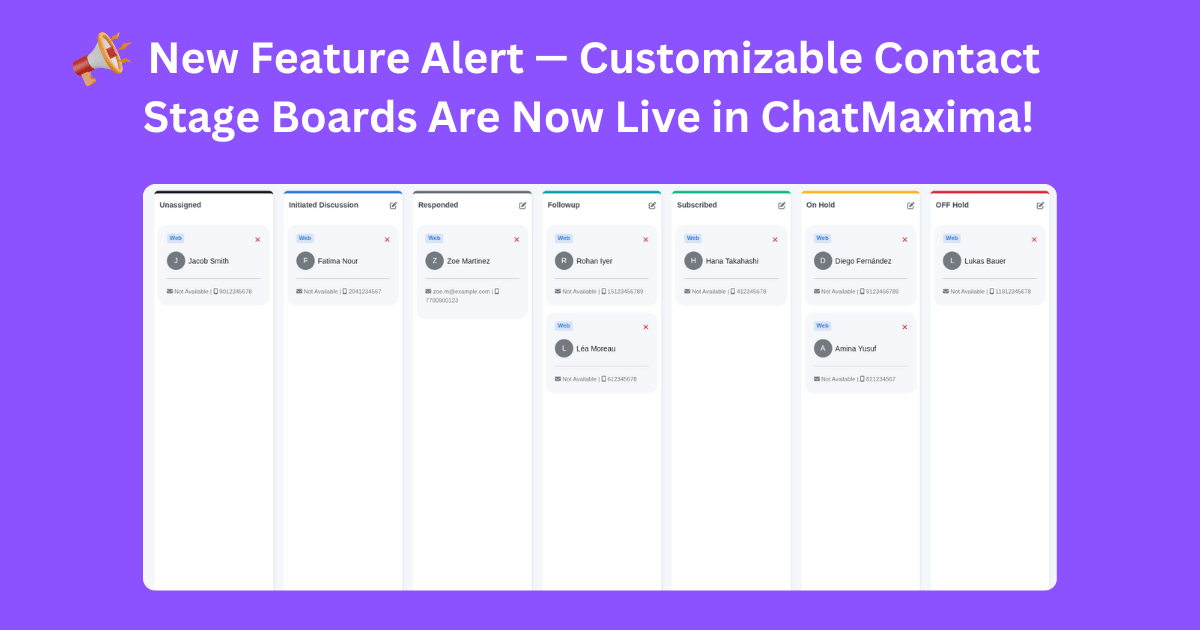
📢 New Feature Alert — Customizable Contact Stage Boards Are Now Live in ChatMaxima!

📢 New Feature Alert — Customizable Contact Stage Boards Are Now Live in ChatMaxima!

We’re excited to introduce Stage Boards, a Kanban-style contact management system designed to streamline how you organize, track, and engage with contacts in ChatMaxima. This visual workflow enhancement helps you move contacts across stages with ease, offering better clarity and control over your engagement pipeline.

With Stage Boards:

  • You can create up to 6 custom board statuses (e.g., New Lead, In Progress, Follow-Up, Closed, etc.)

  • Contacts can be dragged and dropped between boards, just like in Kanban tools

  • Board statuses can be edited, renamed, or deleted (except the default Unassigned Board)

To get started:

  • Go to your Contacts List

  • Create board statuses that match your unique workflow

  • Assign or drag contacts into appropriate boards

  • Customize board names anytime as your pipeline evolves

💡 Why Stage Boards Matter

  • Kanban-Style Visual Organization: View your contacts as cards moving through stages in a board-based layout

  • Visual Contact Segmentation: Instantly understand where each contact stands in your communication process

  • Flexible Workflow Management: Tailor your stages to match any sales, support, or follow-up process

  • Easy Customization: Keep your boards relevant with full control over their labels

  • Scalable Structure: Works seamlessly whether you're managing a few leads or thousands of contacts

🚀 Stage Boards are perfect for teams who want to:

  • Track contact stages visually and efficiently

  • Customize workflows without adding clutter

  • Eliminate confusion across teams

  • Improve collaboration and visibility in real-time

Take control of your contact pipeline with Stage Boards, the Kanban-style system now available in your ChatMaxima dashboard!
Jul 5, 2025
Channels
Soniya Soniya

🚀 New Feature Release: SalesNexus Integration + Contact Sync

🚀 New Feature Release: SalesNexus Integration + Contact Sync

We’re thrilled to announce a powerful new update — the integration of SalesNexus CRM with ChatMaxima! You can now sync your SalesNexus contacts directly into ChatMaxima and supercharge your communication workflows across all supported channels.

🔧 What’s New?

You can now integrate your SalesNexus account with ChatMaxima and manage your contacts effortlessly from the Contacts Page:

Seamless SalesNexus Integration
🔄 Sync Contacts from SalesNexus to ChatMaxima
📲 Assign Channels to Synced Contacts
👤 Map Contacts to ChatMaxima Accounts

Once the integration is complete, all synced contacts will automatically appear in your ChatMaxima contact list — ready for omnichannel engagement.

⚙️ How It Works

  1. Connect your SalesNexus account through ChatMaxima’s integration panel.

  2. Head to the Contacts Page and initiate the sync.

  3. Select and assign communication channels to the imported contacts — Facebook, WhatsApp, Instagram, Web, Telegram, and more.

  4. Assign each contact to the appropriate account to complete the sync process.

That’s it! Your SalesNexus contacts are now part of your ChatMaxima ecosystem.

🚀 Benefits of the Update

🔗 Unified Contact Management: Sync and manage all contacts in one centralized location.

⚙️ Frictionless Setup: Simple integration and fast syncing — no technical overhead.

📞 Omnichannel Engagement: Connect with your CRM contacts on the channels they prefer.

📋 Improved Targeting: Assign specific accounts and channels for personalized communication.

📈 Scalable CRM Workflows: Whether you’re syncing 100 or 10,000 contacts, your outreach stays organized and automated.

🎯 This update is perfect for teams who want to:

  • Eliminate manual data entry between CRM and chat tools

  • Run outreach campaigns directly from synced contacts

  • Personalize engagement across multiple channels

  • Scale customer relationships with ease

Start syncing your SalesNexus contacts today from your ChatMaxima dashboard — and take your CRM-powered conversations to the next level!

Jul 5, 2025
Chatbots
Soniya Soniya

🚀 New Feature Release: NocoDB Integration + Block-Based Data Operations

🚀 New Feature Release: NocoDB Integration + Block-Based Data Operations

We’re excited to roll out a powerful new update that brings seamless integration between ChatMaxima and NocoDB, giving your bots direct access to real-time data operations — right inside your automation workflows.

🔧 What’s New?

You can now integrate your NocoDB account with ChatMaxima and create dynamic, data-driven blocks within the Studio:

Perform key NocoDB operations like fetching, creating, updating, and deleting rows — all from within ChatMaxima.

These operations are now fully available through the NocoDB Block, and all changes reflect instantly in your connected NocoDB tables.

⚙️ Added Support: Visual NocoDB Blocks in Studio

After integration, you can drag and drop a NocoDB Block directly into your bot flow. Each block is fully configurable, making it easy to connect bots with your NocoDB tables in just a few clicks.

🚀 Benefits of the Update

Real-Time Data Access: Perform live operations on your NocoDB database during user interactions.

🛠️ No-Code Automation: Use NocoDB blocks without writing a single line of code. Just map your fields and go.

🔗 Fully Integrated: All updates and data sync seamlessly with your NocoDB account.

🤖 Smarter Bots: Create bots that can read, write, and update data based on real-time inputs or conditions.

📊 Scalable Workflows: Whether it’s a simple contact form or a complex ticketing flow, your bots can now work directly with backend data.

🎯 This update is perfect for teams who want to:

  • Connect bots to real-time databases

  • Create form-like experiences with backend logic

  • Build advanced automation workflows using NocoDB

  • Keep everything centralized and dynamic

Start using the NocoDB Integration & Block today from your ChatMaxima Studio — and power up your bots with live database capabilities!

Jul 5, 2025
Channels
Soniya Soniya

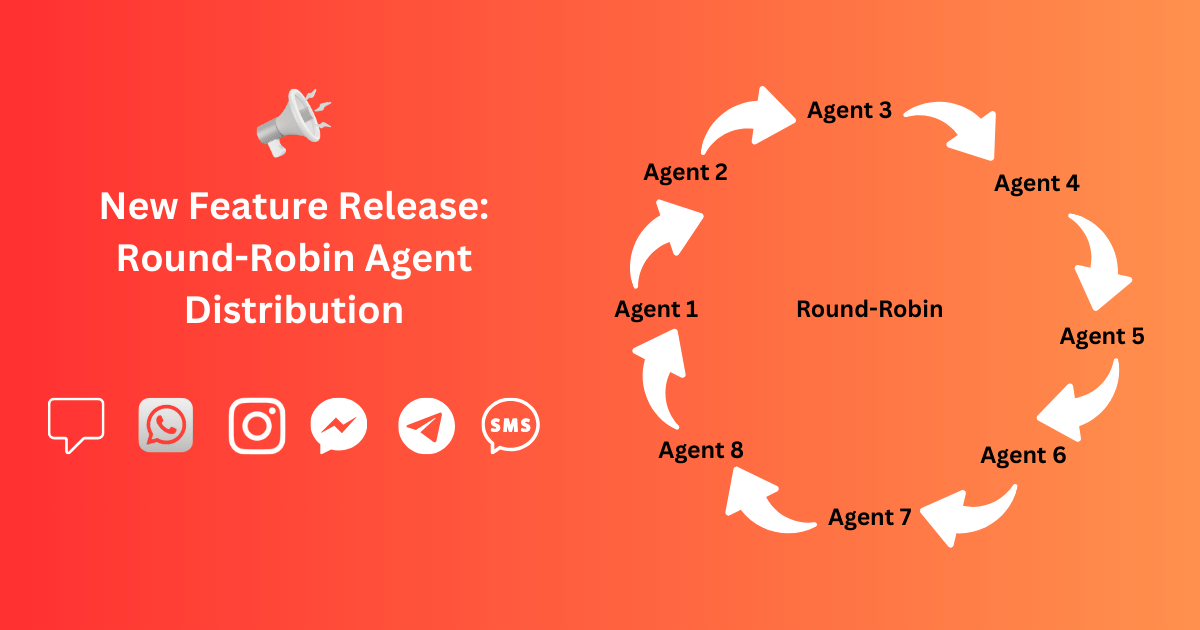
🚀 New Feature Release: Default Assignment Settings + Round-Robin Agent Distribution

🚀 New Feature Release: Default Assignment Settings + Round-Robin Agent Distribution

We’re excited to roll out a powerful new update that puts more control and automation into your hands for managing incoming conversations across all supported channels — Web, WhatsApp, Instagram, Facebook Messenger, Telegram, and SMS.

🔧 What’s New?

You can now predefine default settings for incoming conversations at both the Channel and Account level:

✅ Default Department Assignment
👨‍💼 Default Agent Assignment
🏷️ Default Status Setting

This means every new incoming message will automatically follow your predefined routing logic — helping your team respond faster and more consistently.

⚙️ Added Support: Automatic Round-Robin Agent Assignment

In addition to the Manual Assignment method, you can now enable automatic Round-robin distribution of conversations among available agents within a department.

🚀 Benefits of the Update

  • Faster Response Times: Conversations are instantly routed to the right department and available agent — no manual intervention needed.

  • Improved Organization: Maintain a clean and consistent workflow across all your messaging channels.

  • Better Team Collaboration: Round-robin ensures fair load distribution among agents, reducing burnout and improving morale.

  • Higher Customer Satisfaction: Customers connect to the right person faster, with fewer delays and misroutes.

  • Scalability Made Easy: Whether you’re handling 10 or 10,000 messages, the automated routing keeps your support flow efficient.

🎯 This update is perfect for teams aiming to improve first response time, eliminate manual bottlenecks, and scale operations across multiple channels.

Try it out today from your ChatMaxima dashboard and supercharge your support operations!

Jun 5, 2025
ChatMaxima Studio
ChatMaxima Support ChatMaxima Support

🚀 New Model Support: Gemini 2.5 Preview (06-5) & Grok-3 Now Available

🚀 New Model Support: Gemini 2.5 Preview (06-5) & Grok-3 Now Available

We’ve added support for the latest AI models to supercharge your assistants in ChatMaxima Studio!

🔹 Newly Supported Models:

  • Gemini 2.5 Preview (06-05) – Experience Google's newest update with improved reasoning and response quality.

  • Grok-3 – Leverage xAI’s most capable model for dynamic, intelligent interactions.

  • Grok-3 Mini – A lightweight alternative focused on speed and efficiency.

🔍 How to Use:


Go to ChatMaxima Studio → Create / Manage Chatbot → MaxIA AI Assistant, then choose your preferred model under Model Selection.

Experiment, compare, and choose the model that best fits your assistant's tone and use case!